
It turns out you have to be good at this in the present. Lots of things can fail in the part change and depending on what fails you get various, sometimes mysterious symptoms. I’m going to describe some I’ve gone through recently, but I’m sure these wont be the last ones.
Let me start by saying I’m not very good at this, and I’m not being a particularly quick learner; although I don’t think I’m repeating any specific mistake more than once. Also, I confess to being something of a reactive person when it comes to problem solving at times, especially when it seems like problems are happening one after the other.
Gcode
The actual commands to the program that runs the printer. This moves the print head around, gets readings, and controls other devices like the hot end (heater and thermistor). I would have liked to not have to have known this, guess again. Maybe the software will be better, but probably not.
What’s reliable?
What has been remarkably reliable is the basic mechanism that moves the stage and extruder around. had run into a specific problem, but once that was fixed it has been flawless. That said, I intend to print some of the upgrade parts once things settle down.
In particular there’s an upgrade for the X axis that includes a belt tensioner and a provision for a 7mm lead screw to replace the plain 5mm machine screw currently used to run the Z axis.
There are also upgrades for adding adjustable stops and I want to think about how bed leveling could be done better.
Extruder
Almost all my issues have had to do with adhesion of the melted filament to the bed and the extruder. My first piece of advice: Get a lot of spare extrusion parts!
- Heat break tubes (and watch out, these are fragile. Don’t find out like me that you can’t use arm strength on them – fingers only) Get them teflon lined.
- Nozzles
- Hot ends (at least a few extras
- Themistors appropriate for the hot ends you’re using
The extruder is built roughly like this:
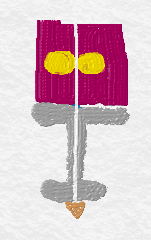
The yellow circles are “gears”. They press on the filament and propel it downward toward the nozzle (the small brown triangle at the bottom. The gray parts are the components that actually extrude the filament. The top piece is a holder for the top end of the heat break. The heat break is a threaded hollow shaft, often lined with PFTE (teflon). It keeps the heat at the business end at the bottom so the filament doesn’t melt and jam the extruder.
The bottom end of the heat break ends in the “hotend” which is a small aluminium block. That block holds the nozzle, which mates with the heat break, the heater and the thermistor that reports the current temperature.
The other components (not shown) are the extruder stepper motor that drives the gears and the fan and heatsink that keep the extruder and top metal block cool.
I ran into some problems because I hadn’t setup the fan to automatically run. That requires setting up a line of gcode to start the fan and, of course, this is documented exactly nowhere.
If the fan doesn’t run the heat can possible make it hot enough at the top end of the heat break to allow the filament to be soft enough to bend and block and jam the extruder. If this should happen I’ve figured out that the nozzle should be removed and I think the ends of the clogged piece can be cut. But you are in for some amount of disassembly so don’t do what I did and make sure the fan is running!
If you need to disassemble you should pay close attention to the orientation and location of parts. I had a probably reassembling even though it should be been fine because the fan was 90 degrees off from where it needed to be – just saying.
Motor issues
The motors in the machine are all stepper motors. A stepper motor turns in discrete units and are used extensively for accurate motion. The most familiar device you own with them is an inkjet printer. There are probably many more in your house.
The motor is connected to a driver and the driver is connected to the Ramps board:
(Motor) <- wiring harness -> driver board (A4988) -> Ramps 1.4
The driver board controls the current and commands going to the actual motor. The ones rated for the motors with the kit are A4988, which seems pretty popular if you search Amazon. Five (the four you need and a spare) cost about $10.
The Ramps board takes commands from the Arduino processor and sends them to the motors and takes input from the limit switches and thermistors and brings them back for the arduino. The Ramps is made to just plug into the Arduino.
If a motor is not working it could be that:
- One or both of the coils are bad (these motors use permanent magnets on the rotor)
- The one or more wires in the cable is open fully or itermittently
- The driver is bad
- The driver isn’t set right
Configuration
Twenty or thirty parameters. Do you want your first layer higher or lower than the rest? Extruded hotter or cooler, with the same bed temperature or not? How about the feed rate? It has taken awhile to start getting familiar with the terms.
Then there is this whole problem of “supports”. You can guess that jumping a big empty area with a hot plastic string isn’t going to work very well. What the “slicer” will do is add support structures. A base layer around the object to help it stick better to the build plate, supports to keep overhangs from collapsing and other details.
Then there are infills. The “solid” areas are not rendered in solid plastic but rather a plastic mesh like a honeycomb (one option). You can choose the amount of fill percentage; the more the percentage, the less air and the heavier and denser the part will be.

 My Gifted Life